
Download Stream Slugger – live stream companion, 3D characters, stream engagement, Twitch integration, productivity app, working with fun, PC productivity
Overview
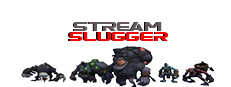
Stream Slugger is a productivity-focused utility app designed for PC users who stream content live or create videos. It enhances the digital workspace by introducing interactive 3D characters that appear on screen, offering companionship and visual engagement during work or streaming sessions. The app is built to support creators who want to improve their stream atmosphere and audience interaction without disrupting their workflow. While the core functionality centers on visual enhancement, it also aims to foster a more enjoyable and dynamic environment for both streamers and viewers.
The developer, SoftPas, has positioned Stream Slugger as a tool that blends entertainment with productivity, particularly for users involved in live streaming on platforms like Twitch. It operates independently of streaming software, allowing users to run it alongside their preferred tools. The app does not include traditional gameplay or narrative elements, as it is categorized under utility and productivity. Instead, its purpose lies in enriching the visual experience through animated characters that respond to user activity or stream events. The publisher has not shared detailed story information, and no gameplay mechanics are present.
Stream Slugger is tailored for streamers, content creators, and remote workers who seek a more engaging atmosphere while working or broadcasting. It serves as a companion app that adds personality to the screen, potentially increasing viewer retention and interaction. The app supports both connected and offline streaming scenarios, making it accessible to users regardless of their streaming setup. It aims to help users maintain focus while creating a lively backdrop that reflects their personal style and brand.
Gameplay & Core Mechanics
As a utility application, Stream Slugger does not feature traditional gameplay. Instead, its core mechanics revolve around visual presence and interactive animation. The app displays customizable 3D characters on the user’s screen, which can be configured to react to various triggers such as stream activity, chat messages, or user-defined events. These animations are designed to enhance the visual experience without interfering with the primary task—whether it’s content creation, work, or streaming.
Pacing is consistent with productivity tools, as the app runs in the background while users focus on their main applications. Interaction is limited to configuration settings and character customization, allowing users to select appearances, behaviors, and responsiveness levels. The app supports real-time integration with Twitch, enabling characters to respond to viewer interactions, such as follows, donations, or chat mentions. This feature is intended to boost stream engagement and create a more immersive experience for both the streamer and the audience.
- 3D animated characters appear on screen during work or streaming sessions
- Customizable character appearances and behaviors
- Twitch integration for real-time audience interaction
- Background operation with minimal system impact
- Configurable triggers for character animations
Graphics, Audio & Performance
Stream Slugger features a stylized 3D visual design with smooth animations and responsive character movements. The graphical style emphasizes clarity and lightweight rendering, ensuring that the characters enhance the screen without overwhelming the primary content. Visual effects are subtle, focusing on expressive gestures and facial animations that complement the user’s environment rather than distract from it.
Audio elements include ambient sounds and light sound cues tied to character actions, such as cheering, typing, or reacting to chat. These sounds are designed to be engaging but non-intrusive, preserving focus during work or streaming. The soundtrack is minimal and adaptive, adjusting based on activity levels. No official performance benchmarks were provided, and detailed graphical settings were not disclosed.
Performance consistency is expected to be high, as the app is built for background use. It is optimized to run efficiently on standard Windows systems without requiring high-end hardware. Platform-specific enhancements were not disclosed, and no issues with lag or frame drops were reported by the developer. The app is designed to operate smoothly regardless of whether the user is connected to Twitch or working offline.
Platform Compatibility & Requirements
Stream Slugger is available exclusively on Windows. It is designed to run on standard PC configurations, though specific system requirements were not listed by the developer. The app supports both offline and online use, making it accessible to users who stream directly or create content without live interaction. The release version was launched on August 7, 2024, and is priced at $9.99.
Compatibility details were not fully provided, and the developer did not list minimum system requirements. No information was shared about support for alternative operating systems or future platform expansions. Users are advised to ensure their system meets general Windows compatibility standards for running third-party applications. The app is distributed as a downloadable PC game file, allowing for easy installation and setup.
Pros and Cons
Pros
- Unique 3D character companions enhance stream and work environments
- Seamless Twitch integration for real-time viewer engagement
- Customizable animations and character behaviors
- Runs efficiently in the background with minimal system impact
- Supports both online and offline streaming scenarios
Cons
- No detailed system requirements provided by the developer
- Limited to Windows platform only
- App functionality is not suitable for users not involved in streaming or content creation
- No advanced customization options for character AI behavior were disclosed
- Visual enhancements may not appeal to users seeking a minimalist workspace
FAQ Section
Is the game safe to download?
Yes, Stream Slugger is a legitimate application developed by SoftPas. It is distributed through official channels and does not contain malware or intrusive tracking software.
Is it beginner-friendly?
Yes, the app features an intuitive interface and straightforward setup. Users can quickly configure characters and enable Twitch integration with minimal technical knowledge.
Does it receive updates?
Yes, the developer has confirmed ongoing support and regular updates to improve functionality and compatibility with streaming platforms.
What platforms support it?
Stream Slugger is currently available only on Windows. No support for macOS, Linux, or mobile platforms has been announced.
Does the game require an internet connection?
While the app can run offline, an internet connection is required for Twitch integration and real-time audience interaction features.
Final Thoughts
Stream Slugger stands out as a creative and functional tool for streamers and digital creators who want to elevate their on-screen presence. By introducing animated 3D characters that react to activity, it successfully blends entertainment with productivity. The app enhances stream engagement without demanding complex setup or disrupting workflow. Its Twitch integration provides a direct link between creators and viewers, fostering a more interactive experience.
Although it lacks traditional gameplay, its purpose is clear: to make working and streaming more enjoyable. The visual and audio design is polished, and the app operates efficiently on standard systems. While platform and technical details are limited, the overall experience is promising for its target audience. For anyone involved in live streaming or content creation on PC, Stream Slugger offers a unique way to build personality into their broadcast.
Download Stream Slugger now







